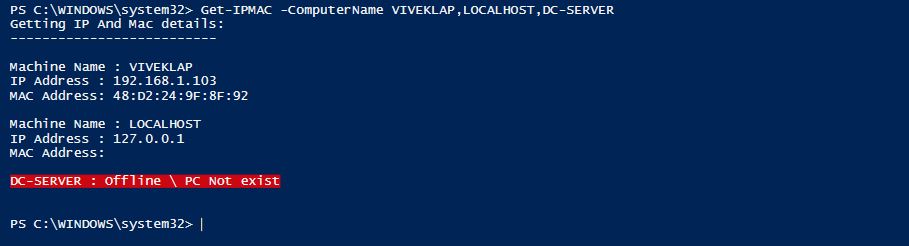
Below function is to get the MAC and IP address of a local or remote machine. The output will be displayed on the screen (write-host). You will be able to get the IP & MAC details for a multiple machine at same time by giving the machine names.
The logic here is, first to get the active IP address of machine and match the IP with MAC address of the matching adapter.
How to get the IP address of a machine
$Inputmachine = "ComputerName"
$IPAddress = ([System.Net.Dns]::GetHostByName($Inputmachine).AddressList[0]).IpAddressToStrin

How to get network adapter details ?
You will be getting all the network adapter details using the below script, including IP and Mac address.
Check what information is available in $IPMAC using the below command.
$IPMAC | select *
$IPMAC = Get-WmiObject -Class Win32_NetworkAdapterConfiguration -ComputerName $Inputmachine
Below is the function to get IP and MAC address of machines
function Get-IPMAC
{
<#
        .Synopsis
        Function to retrieve IP & MAC Address of a Machine.
        .DESCRIPTION
        This Function will retrieve IP & MAC Address of local and remote machines.
        .EXAMPLE
        PS>Get-ipmac -ComputerName viveklap
        Getting IP And Mac details:
        --------------------------
Machine Name : viveklap
IP Address : 192.168.1.103
MAC Address: 48:D2:24:9F:8F:92
.INPUTS
System.String[]
.NOTES
Author - Vivek RR
Adapted logic from the below blog post
"http://blogs.technet.com/b/heyscriptingguy/archive/2009/02/26/how-do-i-query-and-retrieve-dns-information.aspx"
#>
Param
(
    #Specify the Device names
    [Parameter(Mandatory=$true,
    ValueFromPipeline=$true,
    Position=0)]
    [string[]]$ComputerName
)

Write-Host "Getting IP And Mac details:`n--------------------------`n"
foreach ($Inputmachine in $ComputerName )
    {
    if (!(test-Connection -Cn $Inputmachine -quiet))
    {
        Write-Host "$Inputmachine : Is offline`n" -BackgroundColor Red
    }
    else
    {

        $MACAddress = "N/A"
        $IPAddress = "N/A"
        $IPAddress = ([System.Net.Dns]::GetHostByName($Inputmachine).AddressList[0]).IpAddressToString
        #$IPMAC | select MACAddress
        $IPMAC = Get-WmiObject -Class Win32_NetworkAdapterConfiguration -ComputerName $Inputmachine
        $MACAddress = ($IPMAC | where { $_.IpAddress -eq $IPAddress}).MACAddress
        Write-Host "Machine Name : $Inputmachine`nIP Address : $IPAddress`nMAC Address: $MACAddress`n"

    }
}
}